Chapter 3
The Scenes
A scene is one thing on the screen. This chapter walks through every kind c64cast can run, starting with the ones that need nothing and working up to the ones that need other equipment. Each section shows the smallest configuration that works, and says what the scene is genuinely good at.
You do not need to read this chapter in one sitting. Find the scene you want, try it, come back later for another.
Blank#
The simplest scene. It paints a solid canvas in the colors you choose and does nothing else.
[[scenes]]
type = "blank"
name = "Title Card"
duration_s = 12.0
border = "black"
background = "blue"
On its own this is a colored rectangle. Its purpose is to be a backdrop: every overlay that works on character modes works here, so a blank scene plus a scrolling message is a title card, and a blank scene plus a clock and the weather is an information board. Chapter 4 covers overlays properly.
Colors may be given as names or as numbers from 0 to 15. Names are matched loosely, so "light green" and "lightgreen" both work.
Slideshow#
Still images, fitted to the screen and dithered into the C64's palette.
[[scenes]]
type = "slideshow"
name = "Photographs"
display = "mhires"
file = "~/Pictures/*.jpg"
duration_s = 60.0
image_duration_s = 5.0
Two durations, doing different jobs: image_duration_s is how long each picture stays up, and duration_s is how long the whole scene runs before the playlist moves on. The example shows twelve photographs, five seconds each.
The file setting appears on several scene types and always means the same thing: a comma-separated list of files, directories and glob patterns, whose union forms a pool. Point it at a directory and you get everything in it.
file = "~/Pictures/holiday.jpg"         # one picture
file = "~/Pictures"                     # a whole directory
file = "~/Pictures/*.png"               # a pattern
file = "~/Pictures, ~/Downloads/*.jpg" # bothImages are not shown in a fixed order. c64cast shuffles the pool and walks through it, so every picture appears once before any repeats, and none ever appears twice in a row.
Video#
A video file, with its soundtrack, played until it ends.
[[scenes]]
type = "video"
name = "The Clip"
display = "mhires"
file = "~/Videos/clip.mp4"
Note the absence of duration_s. A video scene runs for exactly as long as the video does, and setting a duration on one is rejected rather than quietly ignored, because the two ideas conflict.
Video is where c64cast works hardest. Each frame is decoded, scaled, color corrected and quantized into whatever the display mode allows, then written to the Commodore. The soundtrack is decoded in parallel and played through the sound chip, and the video is paced off the audio clock rather than a timer, so the two cannot drift apart over a long clip.
All that preparation takes a few seconds before the first frame appears, and the Commodore doesn't keep it a secret: a striped loading bar grows across the lower part of the screen while the scene gets ready, and the first frame of video wipes it away. The right edge of the screen is 100% — no numbers needed. If you would rather the screen stay dark while a scene loads, set setup_progress_bar = false under [video].
Web links work as file paths. Direct links to media play immediately; links to video sites are resolved first, which needs the optional yt feature installed. If the link carries a timestamp, playback starts there.
Waveform#
A SID tune, played on the Commodore's own sound chip, with a three-voice oscilloscope drawn from the chip's registers.
[[scenes]]
type = "waveform"
name = "SID Jukebox"
file = "~/Music/hvsc"
duration_s = 180.0
color_mode = "per_voice"
voice_colors = ["cyan", "yellow", "light green"]
This is one of the most satisfying things c64cast does, and it is worth being clear about what is happening. The tune is not being emulated on your computer and streamed as audio. c64cast writes the tune and a small player program into the Commodore's memory and starts it. The Commodore plays the music itself, from its own chip. Meanwhile c64cast reads the state of the three voices and draws them.
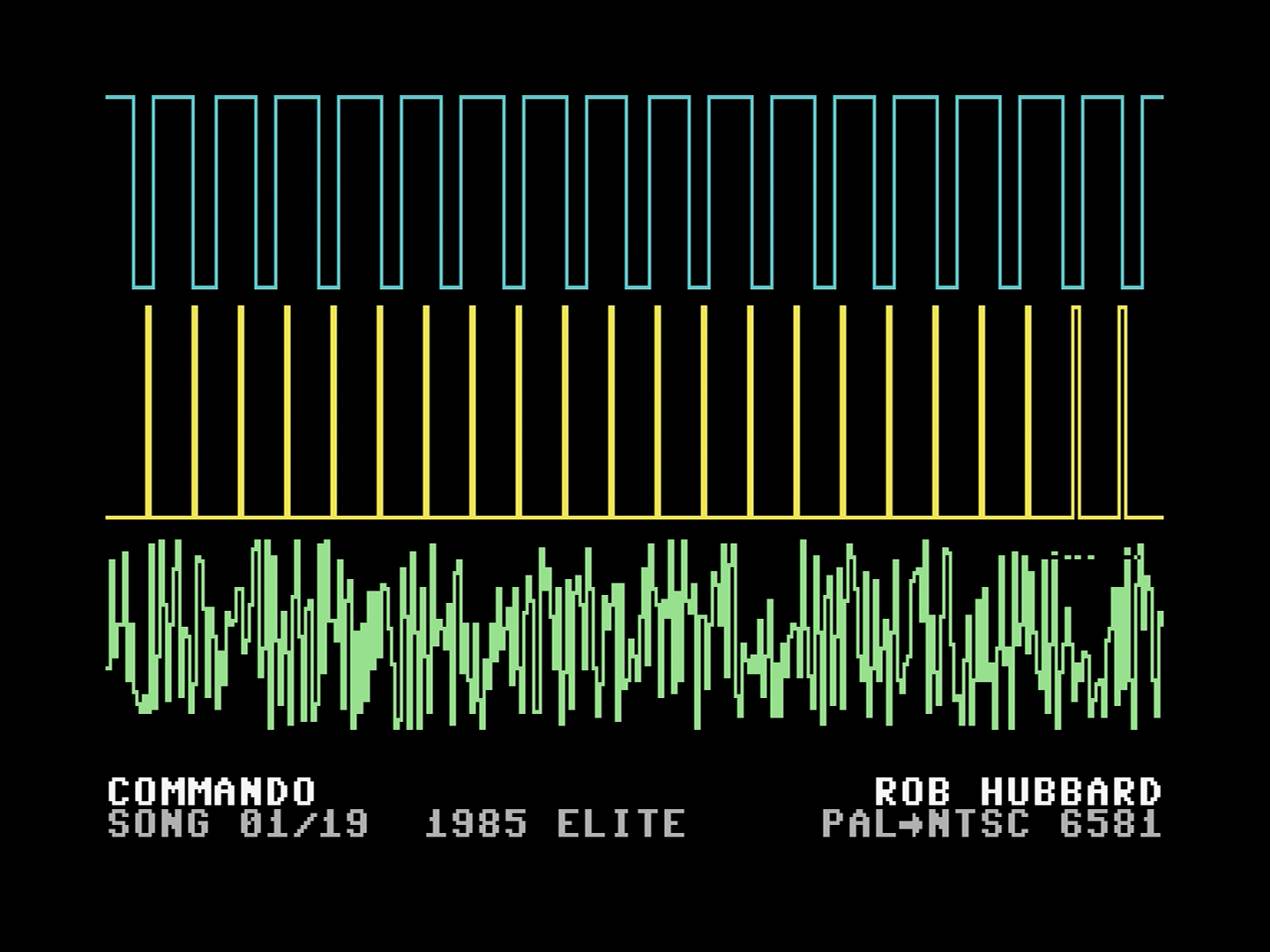
Point file at a directory and each time the scene starts it picks a tune at random. Leave duration_s out and, if you have the SID song-length database, c64cast plays each tune for its actual length.
color_mode decides what the colors mean: per_voice gives each voice its own fixed color, and per_waveform colors by the waveform each voice is currently using, so the picture changes as the music does.
Getting Some Tunes#
c64cast ships no music. The place to get some is the High Voltage SID Collection, a decades-long archival effort that has collected tens of thousands of tunes spanning the C64's entire history. It is free, and it is the definitive source:
Download the archive and unpack it wherever you keep music, then point a waveform scene at it and let it pick:
[[scenes]]
type = "waveform"
name = "SID Jukebox"
file = "~/Music/hvsc"
Point file at the top of the collection and c64cast searches the whole tree, so a single scene can draw on all of it.
The Two Sound Chips#
The Commodore 64 shipped with two different sound chips over its life, the 6581 and the later 8580, and they do not sound the same. Tunes in the collection are usually tagged with the one they were written for, and a tune composed for one chip playing on the other can sound thin, harsh, or simply wrong.
c64cast reads that tag and does what it can about it, with no configuration from you. What it can do depends on the machine. An Ultimate 64 has real chips in sockets and emulated ones in its FPGA, so it looks for a match: another socket holding the right chip, or one of its emulated cores set to behave like it. An Ultimate II+ has no sockets at all — the SIDs feeding its audio jack are emulations from the start, so there is nothing to search for and it simply tells them which chip to be.
Either way it is best-effort and temporary: your machine's own settings come back when the scene ends. If you would rather choose yourself, --sid-model 6581 or --sid-model 8580 forces every tune to one chip and --sid-model off leaves the tag unread.
Which Cable You Listen To#
On an Ultimate II+ this matters more than it sounds like it should, because the two chips come out of two different sockets on two different pieces of equipment.
The emulated SIDs — the ones c64cast configures — are heard on the Ultimate's own green audio output jack, on the cartridge itself. Your Commodore's own audio, the one carried by the AV cable to a 1702 or through an RF modulator to a television, comes from the machine's own internal SID. Both are playing the same tune at the same time, and they can be different chips.
So if you set out to hear the difference a model makes and listen through the monitor, you will hear no difference at all — you are listening to the one chip nothing can change. Plug headphones or a line-in into the Ultimate's green jack and the same tune sounds as it was written to.
It is worse than merely hearing nothing change. If your machine has a 6581 and the tune wants an 8580, c64cast will set the emulation to 8580 and that is the right thing to do — but through the monitor the tune now plays on the unchanged 6581 and sounds thin and scratchy, while everything in the log says it matched. The natural conclusion is that the SID is dying. It is not. c64cast says so when it happens:
sid hardware: this tune plays as authored on the
Ultimate's own audio output, and on the wrong chip model
through the C64's AV output — the machine's internal SID
is what it is and no setting can change it. That is
expected here, not a failing SID: listen on the
Ultimate's audio jack to hear the tune as written.
An Ultimate 64 does not have this split: it is the Commodore, and its own audio output carries the chips it configures.
Telling c64cast Which Chip You Have#
That internal chip is the one thing c64cast cannot look up. Over a network connection to an Ultimate it can read the configured SIDs directly, but the physical chip in the machine has no such register to ask.
So it guesses, from the oldest rule of thumb there is: NTSC machines usually have the 6581, PAL machines usually the 8580. That rule is often right and easily wrong — plenty of NTSC machines carry an 8580 — so c64cast prints a warning saying it is guessing, and every judgment it makes about that chip rests on the guess.
Tell it once and the warning goes away:
[hardware]
host_sid_model = "6581"| Value | Meaning |
|---|---|
"auto" |
The default. Guess from NTSC/PAL and warn that it is a guess |
"6581" / "8580" |
This machine carries that chip. Stated as fact, no warning |
"unknown" |
Do not guess and do not judge. c64cast says nothing about that chip |
If you do not know which one you have, the label on the chip is the answer: 6581 or 8580, sometimes with a suffix like 8580R5. Opening the machine to look is not required — "unknown" is an honest setting, and everything else still works.
Two settings, easily confused, and it is worth being clear about which is which. [ultimate64].sid_model is about the tune — which chip it should be matched to. [hardware].host_sid_model is about the machine — which chip it actually contains.
If Your Machine Has Two Chips Inside#
Some Commodores have been modified to carry two SIDs internally — an ARM2SID, a SIDFX, a DualSID board — with the second chip answering at another address, commonly $D420 or $D500. Often the two are set to different models, which is much of the reason for fitting one: a 6581 and an 8580 in the same machine, each tune played on whichever it was written for.
Tunes written for two chips play correctly on such a machine with nothing asked of you. c64cast hands the tune to the machine and the tune writes to both addresses itself; the chips are already where the tune expects them, so there is nothing to route. This is true through a TeensyROM+ and through an Ultimate II+ alike.
An Ultimate 64 with an ARMSID or ARM2SID in its SID sockets needs no declaration either: c64cast asks the chip what it is. An ARMSID's model is a setting, so each tune is played on it with the model switched to the one the tune asks for, and switched back afterward. An ARM2SID's second SID answers at $D420 once Ext DualSID Range Split is A5; c64cast sets that for a tune that uses it and puts your setting back afterward, and the second SID is heard through the mixer's Socket 2 channel.
What c64cast cannot do is guess that your machine is one of these. Left undeclared it assumes the ordinary single chip — which is the right assumption for almost every Commodore, and the reason a two-chip tune gets a warning:
sid hardware: this tune drives 2 SID chips ($D400, $D420)
and this machine is not declared to have one at $D420. On
a stock C64 a single SID answers all of $D400-$D7FF, so
both chips' writes land on that one chip and the tune
will not sound as written — you may have picked a
multi-SID tune by mistake. Play a single-SID tune, or
declare an internal dual-SID mod with
[hardware].host_sid_chips.
Most of the time that warning is right and you have picked up a two-chip tune without noticing — they are common in the collections and their filenames say so, usually _2SID. If your machine really does have the mod, declare the chips and the warning stops for good:
[hardware]
host_sid_chips = { d400 = "6581", d420 = "8580" }
Addresses are hexadecimal, with or without a leading $. Every chip gets its own verdict against the tune, so a tune wanting an 8580 on its second chip is judged against the chip that actually answers there. A chip whose model you do not know can be written "unknown" — c64cast will note it is there and pass no judgment on it.
This setting replaces host_sid_model rather than adding to it: once you have listed the chips, the machine is described and the NTSC/PAL guess has nothing left to guess at. List all of them, including the one at $D400.
What You Actually Hear#
Three things decide it: what you are connected through, what is inside the Commodore, and how many chips the tune asks for. All the combinations, and what comes out of each socket:
| Connected through | Inside the C64 | Tune | Ultimate's green jack | C64's AV output |
|---|---|---|---|---|
| Ultimate 64 | — | anything | as written | the same signal |
| Ultimate II+ | one SID | one chip, models agree | as written | as written |
| Ultimate II+ | one SID | one chip, wrong model | as written | thin and scratchy |
| Ultimate II+ | one SID | two chips | as written | collapsed |
| Ultimate II+ | dual-SID mod | two chips | as written | as written |
| TeensyROM+ | one SID | one chip, wrong model | (no jack) | thin and scratchy |
| TeensyROM+ | one SID | two chips | (no jack) | collapsed |
| TeensyROM+ | dual-SID mod | two chips | (no jack) | as written |
An Ultimate 64 has one row because it is the Commodore — the chips it configures are the chips you hear, whichever cable you use.
"Collapsed" deserves a word, because it is not silence and people expect silence. A real SID does not check the whole address it is being written to, so one chip answers everywhere in $D400–$D7FF. A tune written for two chips sends one stream of notes to $D400 and another to $D420, and on a machine with a single SID both land on it. Six voices' worth of instructions arrive at a chip that has three, each one overwriting the last. What you hear is a recognizable tune with something badly wrong in it, which is why it reads as a broken chip rather than a wrong tune.
The two outputs never mix inside the equipment. The Ultimate's emulated SIDs reach its own jack and nothing else; the Commodore's internal SID reaches the AV cable and nothing else. Choosing between them means choosing which lead you plug in — there is no setting for it, because there is nothing in either device to set.
Letting the Machine Pick the Tunes#
Everything above is about describing your machine. There is one thing c64cast can do about a mismatch, and it is not a hardware setting: when a waveform scene points at a whole directory, it can pick from that directory with your chips in mind.
[hardware]
host_sid_chips = { d400 = "6581" }
host_sid_tune_match = "prefer"
"prefer" tries tunes your chips can play as written before the rest — the right model, and a chip at every address the tune drives. A single-SID machine stops landing on two-chip tunes whose second voice-set goes nowhere, and a 6581 machine stops landing on tunes composed on an 8580. Nothing is thrown away: if none of the tunes fit, one plays anyway, because a directory with nothing in it that suits your machine is still better than a silent scene.
"require" is the stricter version — non-fitting tunes are dropped from the pool rather than merely deprioritized. It still falls back to the whole directory when nothing at all fits, and says so in the log, so a mistyped chip table shows up as a warning instead of a scene that never starts.
The default is "off": a directory you pointed at is a statement about what you want played, and quietly narrowing it is a decision that ought to be yours.
Two things worth knowing. This never acts on the NTSC/PAL guess — if you have not declared your chips, nothing is filtered, because dropping tunes out of your own directory on the strength of a convention is not a fair trade. And only host_sid_chips can skip a two-chip tune: host_sid_model names one chip without claiming it is the only one, so on its own it checks the model and leaves the chip count alone.
Generative#
Pictures computed from nothing, optionally reacting to music.
[[scenes]]
type = "generative"
name = "Plasma"
display = "mhires"
source = "plasma"
duration_s = 60.0
effect = "trails"
A generative scene is built from three independent choices. The source is the pattern: about twenty of them, including plasma, tunnel, fire, mandelbrot, metaballs, rotozoomer, game_of_life and fireworks. The effect is an optional filter over the result: trails, pulse, rgb_shift or blur. The audio source decides whether the picture reacts to anything.

Setting audio_source turns a pretty pattern into a music visualizer:
audio_source |
What happens |
|---|---|
none |
Silent, and the pattern runs on its own clock. The default |
file |
Play an audio file through the C64, and react to it |
sid |
Play a .sid tune on the real chip, and react to it |
mic |
Play live microphone input through the C64, and react to it |
listen |
React to live input, but send no audio to the C64 |
file and sid both need a file setting naming what to play. This is what happens behind the scenes when you hand c64cast an MP3 on the command line: a reactive plasma over your track.
Launcher#
Hand the machine over to a real Commodore program, then take it back.
[[scenes]]
type = "launcher"
name = "Games"
file = "~/c64/programs"
duration_s = 120.0
reset_before_launch = true
c64cast resets the Commodore for a clean start, uploads the program and runs it. From that moment the Commodore is simply a Commodore running a game or a demo; c64cast is not drawing anything.
duration_s here is not a time limit but an idle timeout. c64cast watches for keyboard and joystick activity, and only reclaims the machine once that long has passed with no input. Someone playing a game is not interrupted mid-level. Set max_duration_s if you do want a hard ceiling, and min_duration_s to guarantee a minimum before the idle timer can fire.
On an Ultimate 64 with firmware 3.15 or newer, the launched game can also be played from a MIDI pad grid or keyboard: map a note to a joystick direction or the fire button, and holding the pad holds the joystick. "Playing c64cast Live" in Chapter 5 shows the mapping. Older firmware, the C64 Ultimate on 1.1.0, the Ultimate II+ and the TeensyROM cannot take joystick input this way, and c64cast logs that the input was dropped.
Webcam#
A live camera, quantized to the C64 in real time.
[[scenes]]
type = "webcam"
name = "Live"
display = "petscii"
duration_s = 45.0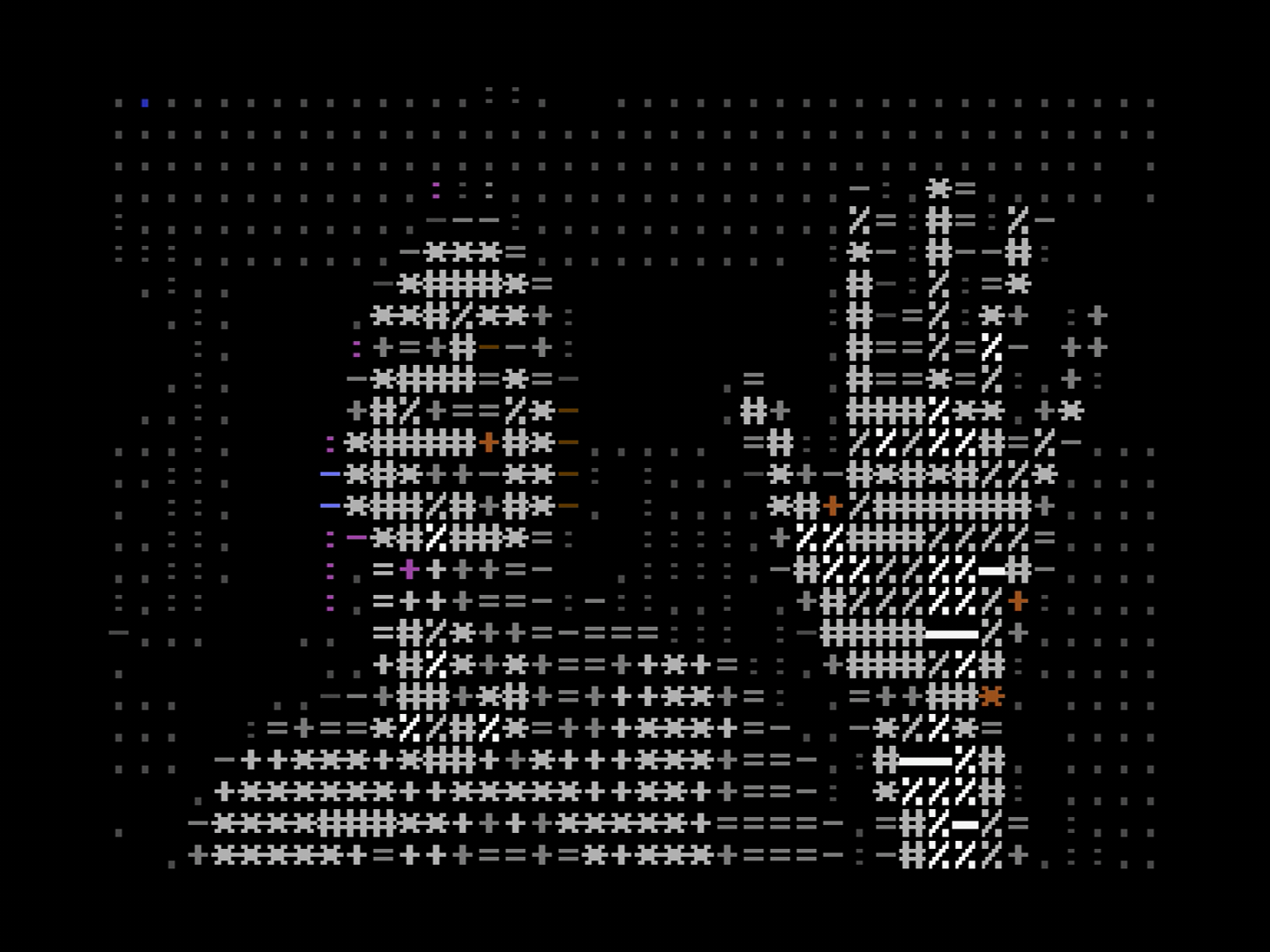
Choose the camera with -d on the command line: a number, or part of the camera's name, or its USB identifier. c64cast --list-devices prints everything it can find.
display = "petscii" builds the picture out of the Commodore's own character set, choosing a glyph by brightness and a color by hue. It is the mode people find most charming, and it is fast, because character modes move far less data than bitmaps do.
MIDI#
Play the real SID chip from a keyboard.
[[scenes]]
type = "midi"
name = "SID Synth"
duration_s = 300.0
Connect a MIDI controller, and c64cast turns what you play into SID register writes, with the same three-voice oscilloscope as the waveform scene. The Commodore becomes a three-voice synthesizer that you play directly. This needs the optional midi feature installed.
ASID#
Receive a SID stream from elsewhere on the network and play it on the real chip.
[[scenes]]
type = "asid"
name = "Incoming"
duration_s = 300.0
ASID is a small protocol for sending SID register writes over MIDI. Several programs speak it: the DeepSID website in a browser, the SIDFactory II tracker, and various software synthesizers. Point one of them at c64cast and whatever it plays comes out of your Commodore's actual sound chip, with the oscilloscope drawn alongside. Composing on a tracker while a real SID plays your work back is a genuinely different experience from hearing an emulator.
WLED#
Turn the Commodore into a video wall for lighting software.
[[scenes]]
type = "wled"
name = "LED Matrix"
display = "mhires"
duration_s = 120.0
This scene makes c64cast pretend to be an LED matrix. Lighting programs such as LedFx and xLights stream pixels to it over the network in the usual formats, and c64cast paints them on the Commodore's screen. It is the inverse of the more common arrangement, and it is covered along with the rest of the LED integration in Chapter 5.
Choosing Between Them#
If you are not sure where to start:
- For something impressive with no preparation, try waveform with a directory of SID tunes.
- For something that looks good on a shelf all day, a slideshow of photographs with a clock overlay.
- For a party, generative with
audio_source = "mic". - For a demonstration to someone who knows what a Commodore is, video, because the disbelief is worth watching.
The next chapter is about making any of them look better.