Chapter 3
The Display Pipeline
A frame arrives as ordinary color pixels and leaves as bytes the VIC-II can render. Between those two states it is cropped, filtered, downscaled, shaped, dithered, matched against sixteen colors, and packed into whatever memory layout the display mode uses. This chapter is that path in order, and where each setting that shapes it sits on it — nearly all of them [color], plus [hardware].host_palette, which says which sixteen colors the match is aiming at in the first place.
The settings themselves are [color] and [hardware] in Appendix A, palette_mode and display in Appendix B, and the generators and effects in Appendix E.
From Frame to Screen#
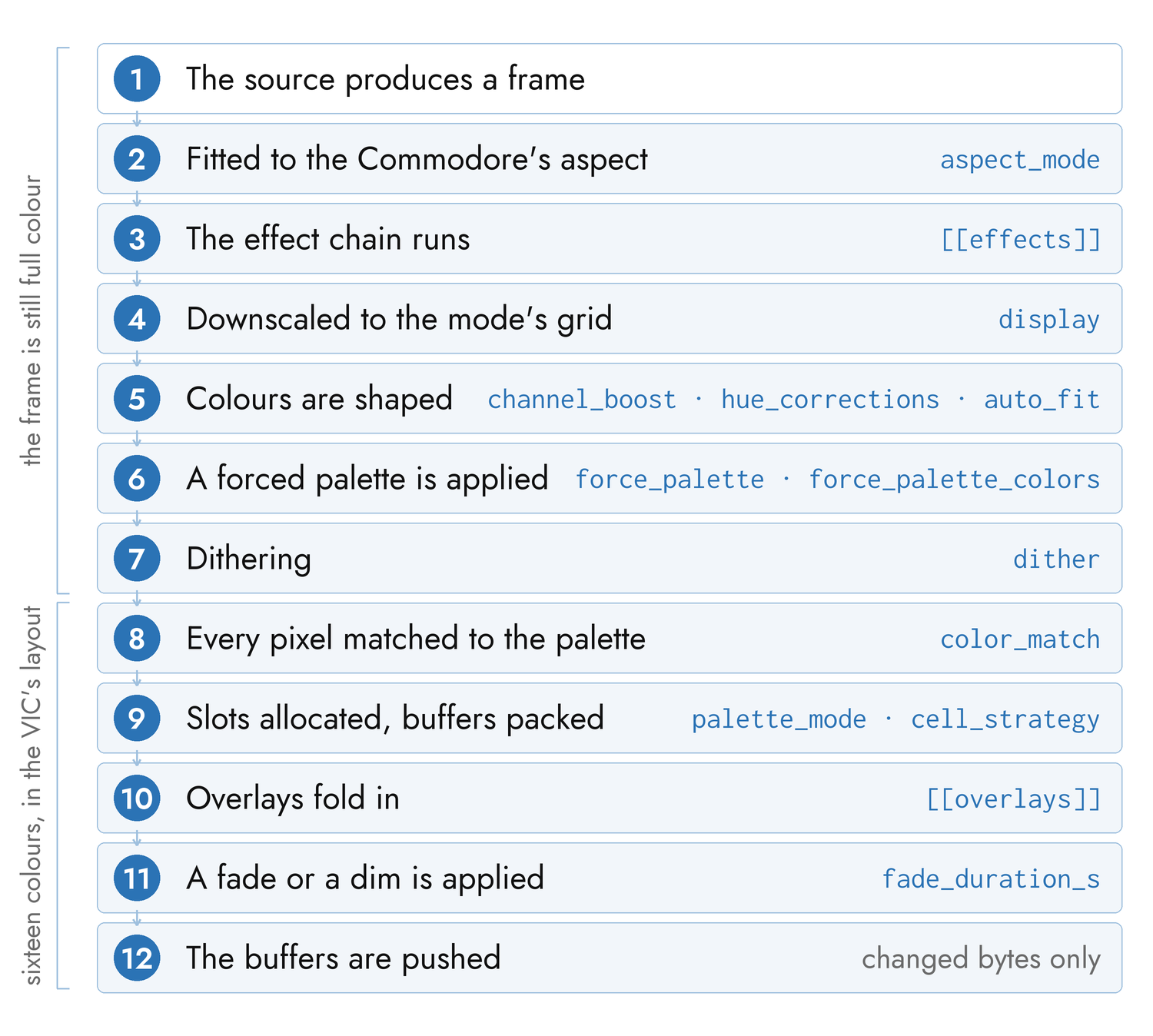
Every frame-bearing scene follows the same sequence.
1. The source produces a frame. A camera hands over its newest frame with no buffering; a video file hands over the frame nearest the audio clock; a generator computes one at 320×200; a slideshow decodes an image; a WLED sink assembles one from arriving packets.
2. The frame is fitted to the Commodore's aspect. The screen is 4:2.5 in pixel terms, which no ordinary source is. crop center-crops to fill and loses the margins; fit letterboxes onto black; stretch distorts. Camera and video always crop. A slideshow chooses with aspect_mode.
3. The effect chain runs. Each layer transforms the frame in order, at source resolution, before anything about the Commodore has been decided. This is the last stage that sees full color and full resolution — see "The Effect Chain" below.
4. The frame is downscaled to the mode's grid. Each display mode consumes exactly one resolution: 40×25 for petscii, 80×50 for mcm, 320×200 for hires, 160×200 for mhires. A video decoder is told that size up front and downscales during color conversion rather than converting at full resolution and throwing the pixels away.
5. Colors are shaped. Three stages, all before any quantization decision: channel_boost applies a fixed per-channel gain, hue_corrections moves chosen hue bands, and auto_fit stretches contrast and saturation to fill the palette's gamut using statistics gathered from the source itself.
6. A forced palette is applied, if one is in force. This is a lookup table, and it short-circuits the next stage: those pixels are already exact palette colors, so dithering them would fight the assignment.
7. Dithering. The ordered family adds a position-dependent threshold offset to every channel, nudging pixels across quantization boundaries. The error-diffusion family instead replaces the final per-pixel decision, pushing each pixel's error onto its neighbors.
8. Every pixel is matched to the palette, in weighted BGR or in CIE-Lab, with the shaping biases folded into the distance. Which sixteen colors it is matched against depends on the machine — see "Near To What" below.
9. The mode allocates its color slots and packs its buffers — which is the part that differs per mode, and the subject of the next two sections.
10. Overlays fold in. A text overlay writes into those buffers rather than poking memory itself, so its glyphs travel with the frame and land in the same write.
11. A fade or a brightness dim is applied to a copy of the buffers, as a palette remap.
12. The buffers are pushed. Only bytes that changed are sent; Chapter 5 covers the transport, the region cache, and the double-buffering that makes a bitmap cut tear-free.
The on-screen display for live tuning and the --frame-numbers debug overlay are drawn at step 3, before quantization, which is why they appear on every display mode without either of them knowing what a display mode is.
The Six Display Modes#
A display mode is a choice about the VIC-II, and each one trades resolution against color differently.
| Mode | Grid it consumes | Color it can show |
|---|---|---|
petscii |
40×25 | one glyph and one of 16 colors per cell |
blank |
none | a solid canvas, for overlays |
mcm |
80×50 | 3 shared backgrounds + one foreground per character cell |
hires |
320×200 | 2 colors per 8×8 cell, one bit per pixel |
hires_edges |
320×200 | as hires, over detected edges |
mhires |
160×200 | a shared background + 3 colors per 4×8 cell |
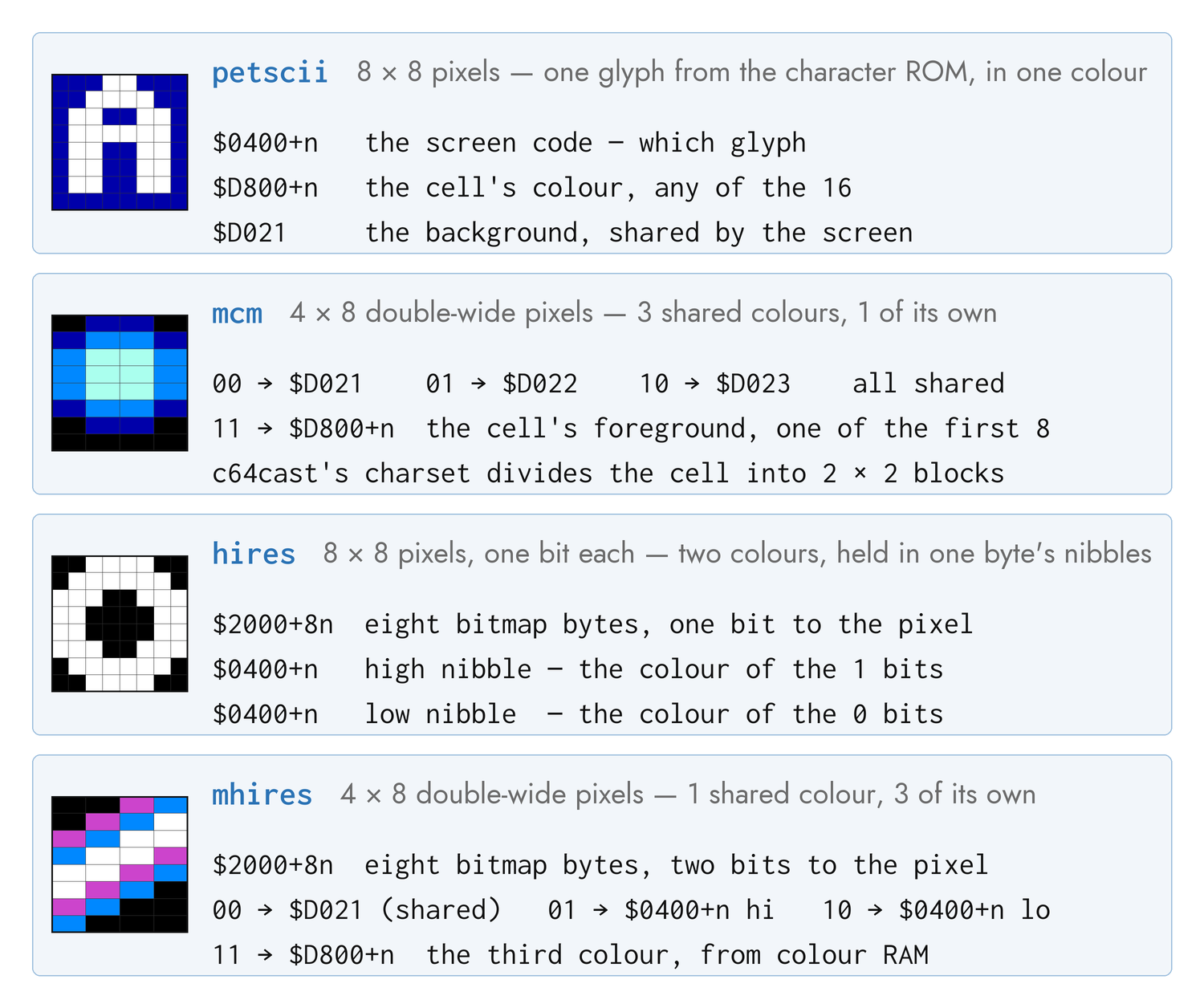
petscii builds the picture out of the machine's own character set: each cell takes a glyph chosen by brightness and a color chosen by hue. It is the cheapest mode on the wire — 1000 bytes of screen and 1000 of color, against a bitmap's 8000 — which is why character modes hold the full system frame rate where bitmaps cannot. It is also, to most audiences, the most obviously a Commodore.
The style key picks the glyph and color policy, and SHIFT cycles through them live:
| Style | What it draws |
|---|---|
default |
Brightness onto an 11-character ramp, color per cell |
halftone |
A five-level block-coverage ramp: chunky and high contrast |
random_glyph |
A fixed random graphics glyph per cell, color still tracking |
letter_rain |
Brightness onto A–Z: a cascade of letters |
neon |
The default ramp with color clamped to the 10 chromatic entries |
inverse_pop |
Space or full block by threshold, in four pop-art colors |
hatch |
A five-level cross-hatch: sketched line art |
color_only |
Every cell a full block; the picture lives in color memory |
random |
One of the above, chosen once at setup |
Each style declares its own border and background, which the mode applies on setup and on every cycle.
blank is the same character mode with no source at all — every cell a space in the background color. It exists to be painted over.
mcm uploads a character set whose glyphs divide each hardware cell into a 2×2 grid of blocks, giving an 80×50 grid of pixels where each block picks one of four colors: three backgrounds shared by the whole screen, plus that character cell's own foreground. The foreground is restricted to the first eight palette entries, because the high bit of color memory is what marks the cell as multicolor in the first place. Cheap on the wire like petscii, with real color and no glyph character.
hires is a genuine 320×200 bitmap, one bit per pixel, where the bit selects between two colors held in the nibbles of that 8×8 cell's screen byte. One of the two is the global background, so the other one decides most of the frame; hires_cell_pick below is how it is chosen. It is the sharpest mode and the most expensive: 8000 bytes of bitmap for every frame that changes.
hires_edges runs Canny edge detection first and draws the edges. It is the default for a live camera, and the reason is motion: an edge picture reads as alive even when frames arrive slowly, where a stale half-tone bitmap reads as broken.
mhires — multicolor bitmap — halves the horizontal resolution to 160 and spends what it saves on color: each 4×8 cell gets a background shared with the whole screen plus three colors of its own, two in the screen byte's nibbles and one in color memory. A single frame can therefore carry up to 3001 distinct colors rather than four, which is why it is the default for video and the right choice for photographs.
Two of these modes accept palette_mode, which decides how those per-cell slots are filled:
palette_mode |
Effect |
|---|---|
percell |
The default. On mhires, a global background plus each cell's own three colors. On mcm, an accepted alias for cheap — that mode already picks a foreground per cell |
cheap |
One set of four colors for the whole screen, picked by pixel frequency |
vivid |
The same, but slots after the first prefer hues at least 45° from those already taken — for frames that keep collapsing to two near-shades |
grayscale |
Every decision restricted to the five gray entries, with the slots fixed in luminance order. An old-broadcast look, and stable enough to hold full frame rate |
percell is what makes mhires worth using: a cell that contains no background color stops wasting a slot on it, and a corner of the frame stops being forced into a palette chosen for the subject in the middle.
Quantizing a Cell#
Four settings decide what a cell ends up looking like, and they are orthogonal: two pick which colors a cell may use — one for mhires, one for hires — one picks how near is measured, and one decides which of the available colors each pixel takes.
All four are read from [color], but any scene can override its own copy of any of them (and everything else in this section) in a [scenes.color] sub-table — see "Scenes and Playlists" in the config rules chapter.
Which Colors — cell_strategy#
mhires with palette_mode = "percell" is the mode this question belongs to: given every color present in a 4×8 cell, which three fill its slots?
cell_strategy |
Picks |
|---|---|
frequency |
The three most common. Temporally stable |
luminance |
Darkest, median and brightest, so a cell's full tonal span survives |
contrast |
The two luma extremes plus the color farthest from both |
error-min |
The trio that minimizes the cell's reconstruction error |
"auto" chooses error-min for a slideshow, where the image is composed once and the search is paid for once, and frequency for anything in motion, where stability matters more than optimality — the tonal strategies re-rank on noisy content and churn the slots frame to frame.
On photographic material the strategies mostly agree; most cells hold three or fewer colors after quantization, and every strategy then picks the same set. They separate on busy, high-detail images. luminance and contrast can speckle a near-flat region by forcing a tonal extreme onto a lone outlier pixel, which is why "auto" never selects them.
Which Color on a Hires Cell — hires_cell_pick#
hires faces a narrower version of the same question. It gets two colors per 8×8 cell and one of them is the global background, so the only real choice is the other one — which means this single decision sets most of the frame.
hires_cell_pick |
Picks |
|---|---|
error-min |
The default. The color that minimizes that cell's own reconstruction error, fitting all 64 pixels |
sample |
Reads one pixel per cell and takes its nearest color |
error-min reuses the distance matrix the quantizer has already built, so it costs about 0.8 ms a frame. It buys roughly a quarter less reconstruction error on photographic content — about −24 % mean Lab, holding across every dither setting — and the gain tracks how much a cell's own pixels disagree: nothing on a smooth gradient, around −32 % on high-frequency detail.
It is also the stabler of the two, which is the opposite of the trade one-pixel sampling looks like it is making. A single read follows sensor noise directly, so a static subject under a noisy camera rewrites cells that no human would call changed; fitting the whole cell averages that noise out, and the same subject stops writing to the screen at all. sample is therefore for a tight CPU budget and nothing else. Neither applies to the hires_edges styles, which are fixed at two colors by construction.
How Near — color_match#
The default distance is a brightness-weighted BGR metric: fast, but it over-weights luminance, so a warm mid-gray — skin — can land nearer a gray entry than orange or brown. color_match = "perceptual" measures in CIE-Lab instead, which picks the color the eye calls closest.
"auto" chooses perceptual on every mode that picks colors at all, and the weighted metric on the two that do not (blank and hires_edges). MCM gains the most: smoother skin gradients and much less per-cell speckle.
Perceptual matching swaps the distance space and nothing else. The shaping — channel_boost and the bias that keeps borderline pixels off the gray axis — still applies, and that is deliberate: an accurate but unbiased match fragments flat desaturated regions, a pale sky, into drab gray.
Near To What — [hardware].host_palette#
Both metrics measure distance to the sixteen C64 colors, which raises a question neither of them answers: sixteen colors as rendered by what? The palette is fixed as an idea and not as a set of RGB triples. An Ultimate 64's video output and a real VIC-II's are about 25 counts per channel apart, and 60 apart on orange.
That is not a tint the eye discounts and then forgives, because the quantizer picks by distance: aim at the wrong table and pixels are sent to the wrong color outright. Measured on an Ultimate 64 against the VIC-II rendering, that was 18.8 % of pixels and +12.9 % mean perceptual error, worst on the grays, the browns and orange.
host_palette |
Means |
|---|---|
auto |
The default, and needs no configuration. Ask the machine: an Ultimate 64 reports the sixteen colors it is driving, or is assumed to show its built-in table when its firmware cannot answer, and anything else is driving a real C64, so assume a VIC-II. Under --skip-probe nothing is asked, and a VIC-II is assumed for every machine |
u64 |
The Ultimate 64's own table, stated outright |
pepto |
The classic VIC-II rendering — right for a real C64, so for an Ultimate II+ and for a TeensyROM+ in a breadbin |
| a path | A VICE .vpl file, which is how to describe a machine running a custom palette |
auto is right on every stock setup, and this is a setting most configurations should never contain. An Ultimate 64 running firmware 3.15a or newer answers auto with the colors it is really driving — a custom .vpl loaded from flash included. It is answered over the Command Interface, already one of the three services a run needs: "The Three Network Services".
Reach for a stated value when the machine cannot be asked or its answer is not the whole story: firmware older than that, where a loaded .vpl goes unseen and the built-in table is assumed instead, or a display whose own processing you have already characterized. For the first, point a path at a local copy of that .vpl.
An Ultimate 64 on 3.15a or newer can also be told to show sixteen different colors for a scene, and the quantizer then aims at those instead: "Choosing the Sixteen".
Note that this is a [hardware] setting rather than a [color] one, and deliberately: it says what the machine emits, not what the show should look like. It belongs with the other machine declarations, and a show file carried to a second Commodore should not be the thing that describes the first one's video output.
Which Pixel Takes Which — dither#
Dithering trades a little spatial noise for apparent colors the palette does not have. Two families, and they are integrated differently:
Ordered — ordered and blue_noise — add a fixed, position-dependent offset to every channel before the nearest-color search. They are one vectorized operation over the frame, they hold real-time frame rates, and because the pattern is constant at a given screen position a still source dithers identically frame after frame and a moving one gains no shimmer. ordered tiles the classic 8×8 Bayer matrix and shows its cross-hatch at C64 resolution; blue_noise tiles a mask with no low-frequency structure and does not, at the same cost.
Error diffusion — floyd-steinberg and atkinson — instead replace the final per-pixel decision, pushing each pixel's quantization error onto neighbors not yet visited. Floyd-Steinberg spreads to four neighbors; Atkinson spreads to six and deliberately discards a quarter of the error for punchier contrast. Both are inherently sequential, and both re-diffuse independently every frame with no memory, which is exactly why a sequence of individually excellent frames reads as shimmer.
That is the whole argument behind "auto": floyd-steinberg for a static scene (a slideshow, composed once, where quality is free) and blue_noise for anything in motion. An explicit value is honored for any scene type — you may have Floyd-Steinberg on video, and the shimmer with it.
dither_strength means the same thing across both families, so switching between them needs no retune. Dithering is skipped where a forced palette is active, and petscii has no dither stage at all — its per-cell glyph and color decision is not a pixel grid in the same sense.
Forced and Rolling Palettes#
Everything above tries to be faithful. [color].force_palette is the setting that stops trying.
It clusters the source's colors into N groups and assigns each group a distinct palette entry, so all N colors are used whether or not the source has anything like them. A gamut-clustered source — a film that is essentially black and one shade of blue — then renders in a full palette instead of near-monochrome. It is false color on purpose, it is off by default, and it applies on mcm and mhires.
[color]
force_palette = true
force_palette_colors = 8          # a count, 2..16
# force_palette_colors = ["black", "cyan", "white"]
A count spreads the source across that many distinct colors; an explicit list whitelists exactly those, and its length becomes the count. Names are matched loosely, as everywhere.
Like every other [color] field, force_palette and force_palette_colors can be set per scene in a [scenes.color] sub-table — the way to put a deliberately false-color scene next to a faithful one in the same show without an in-between [color] change.
The map is derived one of two ways, by what the source is. A video or a slideshow is pre-scanned: c64cast seeks to evenly spaced points through the file, decodes one keyframe at each, and fixes the map before the first frame appears. Sources with no future to scan — a camera, a generator, the WLED sink — get a rolling map instead, re-derived about once a second from a sliding window of recent frames.
Rolling has an obvious failure mode, which is popping, and three mechanisms against it: each re-derivation starts from the previous one's clusters, the cluster-to-color assignment is kept unless a new one is clearly better, and a new map is installed only when the set of colors has actually changed — or when a shot cut is detected, in which case the window is cleared deliberately and the change hides behind the cut.
Choosing a good set by hand is guesswork, so there is a command for it:
c64cast --suggest-palette ~/Videos/clip.mkv
c64cast --suggest-palette ~/Pictures/skyline.jpg
It analyzes the source the same way the pre-scan does and prints the palette entries that best represent it, ranked, ready to paste into force_palette_colors. Note it optimizes for faithfulness — the colors nearest what is there — where force_palette itself spreads to distinct colors, so the two answer slightly different questions.
Choosing the Sixteen — hardware_palette#
force_palette and everything before it choose among the machine's sixteen colors. An Ultimate 64 on firmware 3.15a or newer lets c64cast change the sixteen themselves, for the length of a scene:
[color]
hardware_palette = "source"     # "off" (default) | "source"
With "source", a video or slideshow scene fits the palette to its own content before it paints, pushes it to the Ultimate, and points the whole pipeline at it — the nearest-color search, dither, color_match and the fades all aim at exactly what the machine now emits. Black, white and the three grays stay the machine's own, since fades end on black and cards and overlays draw in black and white; the other eleven are chosen from the source, each landing on the palette entry it is nearest, so "red" is still the reddest of them. The fit sees the source after the scene's own [color] shaping (auto_fit, the hue corrections, the channel boost), which is what the quantizer sees too. Measured over the bundled pictures, the per-pixel color error falls to about a third of what the Ultimate's own table gives.
| Scenes | video (from the pre-scan, so a video with it on always pre-scans) and slideshow (per image). Other scenes show the machine's palette |
| When it is pushed | At scene start, and at each slideshow image. About half a second per push, so it is per scene, never per frame |
| Restored | Before the next scene that does not push colors of its own sets up, and at exit, to the palette the machine shows after c64cast's startup reset — its configured palette, a custom .vpl included. A C64 reset during a scene reverts the machine to its configured palette, so c64cast pushes the scene's palette again after every reset it issues |
| Not with | force_palette, which also re-chooses a scene's colors, or a flicker_tolerance other than "off", whose blends are measured against the machine's fixed palette. The configuration is refused, in a performance clip's color too |
| Needs | An Ultimate 64 on firmware 3.15a or newer, and the Command Interface on. A C64 Ultimate on 1.1.0, older firmware, any other machine, an ensemble, and --skip-probe all render exactly as without it, after one warning saying why |
Set it per scene in a [scenes.color] sub-table to use it on one video and not the next.
Motion Smoothing and Fades#
motion_smoothing#
The mhires per-cell path carries two pieces of temporal memory: a smoothed history of which colors each cell has been offering, and a bias that keeps a pixel on the palette entry it had last frame unless the new frame beats it clearly. Both exist to stop per-frame color churn reading as shimmer on noisy video, and both buy that stability by trading away motion tracking — on a hard cut, structure from the previous shot lingers for a moment as an after-image.
[color].motion_smoothing is one dial over both, from 0 to 1:
| Value | Behavior |
|---|---|
1.0 |
Full memory. The most stable, and the ghostiest |
0.25 |
The default: chosen on hardware as the lowest value where flicker stays acceptable |
0.0 |
No memory. Tracks the source exactly, and grainy content can flicker |
Lower it if after-images bother you; raise it if motion shimmers. It affects nothing outside mhires with palette_mode = "percell".
Blending Colors the VIC Cannot Draw — flicker_tolerance#
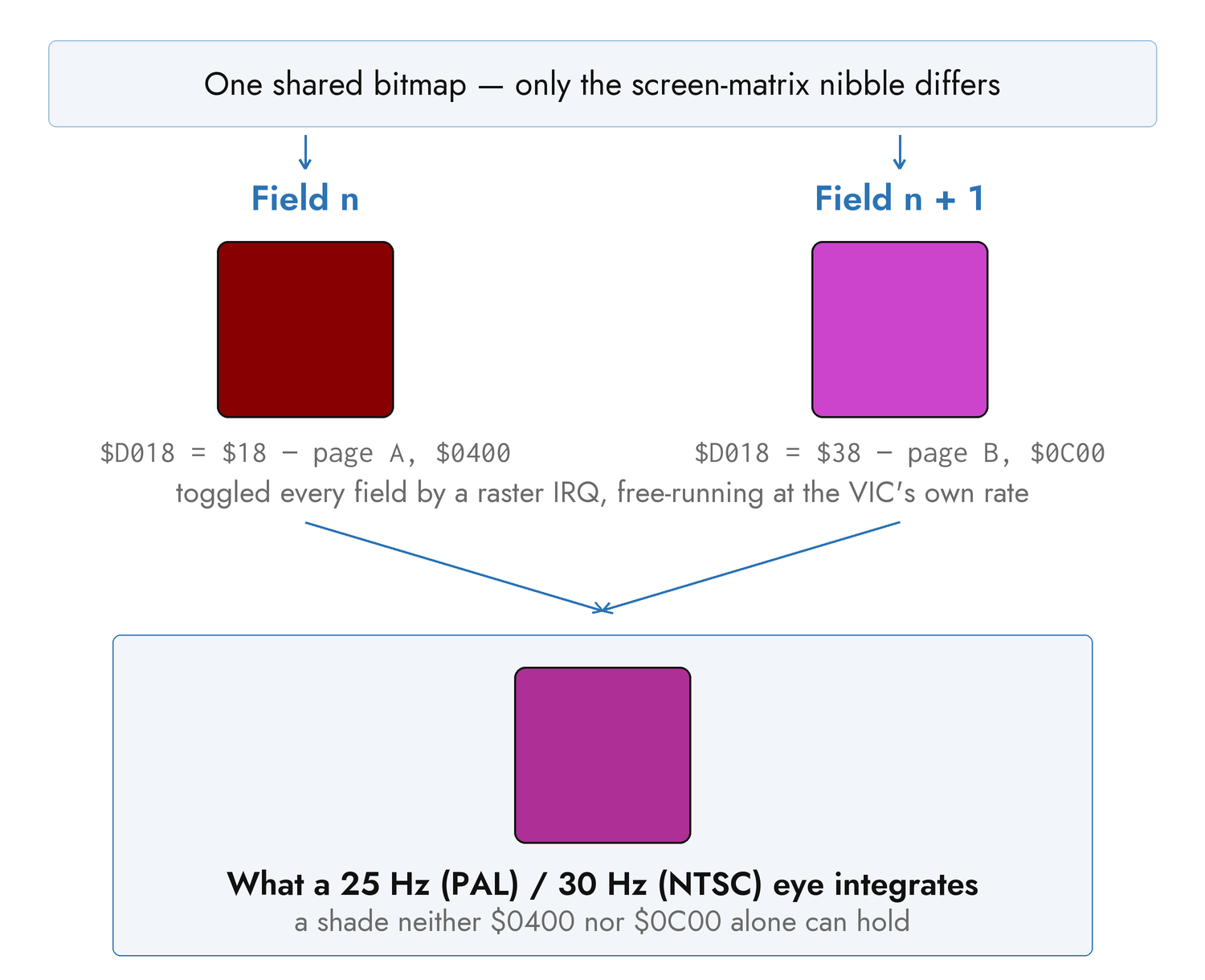
Off by default. hires ("normal" style) and mhires with palette_mode = "percell" can hold two screen pages over one shared bitmap and alternate $D018 between them every video field, so the eye fuses each cell's pair of hardware colors into a shade the sixteen-color palette does not contain — the trick behind Dragon Breed's sky and Mayhem in Monsterland's water. The alternation is owned by a C64-side raster IRQ that free-runs at the VIC's field rate no matter how fast the host pushes frames, so it costs nothing on the link beyond a second screen page.
Not every pair of colors is offered — each candidate was scored by eye, blind, against how visibly it flickers — and flicker_tolerance is a cut across that scale:
flicker_tolerance |
Admits | Colors reachable on an Ultimate 64 |
|---|---|---|
off |
Nothing. The default | 16 |
clean |
Pairs that fused cleanly | 24 |
subtle |
+ pairs that flicker mildly | 30 |
visible |
+ pairs that visibly flicker | 39 |
visible sits inside the frequency band recognized as a photosensitive-seizure risk — treat it as an effect you have chosen to use, not a free upgrade to the palette. flicker_max_luma_delta (default 0.075) is a separate, absolute cap on how far apart in brightness a pair may be, checked for the same reason regardless of which tier admitted the pair.
Which colors qualify depends on [hardware].host_palette: eligibility is a statement about the light one machine emits, not about "the C64 palette" in the abstract, so the table is rebuilt whenever the palette changes. Arming also pins color_match to perceptual and cell_strategy to error-min, because a blended color sits deliberately between two solids and only that distance space and that search find the better fit for a cell. The border cannot join in — $D020 is a single register the field IRQ does not manage, so it holds the field-A color throughout — and the effect does not survive a 30 fps capture: c64cast's own [preview] window and [recording] reconstruct the fused color arithmetically, but a camera records the flicker.
Fades#
[playlist].fade_duration_s fades a scene up from black on entry and down to black on a normal end, across every mode that composes buffers. Set it to 0 for hard cuts. A CTRL skip aborts a fade in progress, because a skip means now.
The Commodore has no brightness register and its sixteen palette entries are not ordered by luminance, so a fade cannot be an arithmetic dim. It is a palette remap: for a given level, each color is replaced by the entry nearest to that color scaled toward black, black always maps to black, and the table is applied only to the color-bearing parts of the frame. The pixel selectors are left alone, which is what keeps black pixels black while the picture dims.
The same machinery serves the brightness slider on the WLED control surface, as a persistent dim rather than a transient fade; the two multiply, so a fade-out from a dimmed scene ramps down from the dimmed level. Scenes with no composed buffers — the oscilloscopes, and a launched program — are untouched by both.
Generators#
A generative scene draws its frames from one of twenty procedural sources. Appendix E lists them all with their live parameters; this is how they behave.
Every generator renders at 320×200 and is downsampled by whichever display mode is in force, so the same source is a different picture in petscii than in mhires and both are worth trying. All of them are pure numpy, and all but two are deterministic in time: the frame at a given moment is the same frame forever, however you got there, which is what makes an offline render reproducible. soap and fireworks carry real simulation state and are the documented exceptions.
[[scenes]]
type = "generative"
display = "mhires"
source = "tunnel"
audio_source = "listen"
reactive = true
duration_s = 120.0
Each generator exposes one or two live parameters — usually a speed and a scale — which a MIDI knob, the web console, or the WLED app's sliders can sweep while the scene runs. Appendix F is the full list of live targets and the names to address them by.
Reacting to music. With reactive = true and an audio source that provides features, a generator reads a small snapshot every frame: the overall level, whether a transient just fired, a beat phase, an estimated tempo, and per-voice frequencies and gates. What each generator does with it is its own business — plasma cycles hue with the tempo and flashes on a transient, halo grows its circles with level, epicycle retunes its arms to the voices — but the shape is always the same: at rest each falls back to its pure time-driven behavior, so a silent scene is still the generator you asked for.
The features come from two producers behind one interface. A SID source runs the tune a second time on a host-side emulator and reads envelopes and oscillator frequencies from that, adding no traffic to the link. A microphone or file source analyzes the audio directly and also fills in a real spectrum, so bass and treble read differently. Which producer is running is invisible to the generators.
The Effect Chain#
An effect transforms the whole frame after the source has drawn it and before the display mode quantizes it, so effects work on any frame-bearing scene — a video and a camera as readily as a generator.
A scene takes either one effect or an ordered chain, and the two spellings are mutually exclusive:
effect = "trails"                             # one
effects = ["trails", "rgb_shift", "strobe"]   # a chain
Layers apply in order, and order matters: blurring a trail is not the same picture as trailing a blur. Each layer is individually tunable while running — fx0.decay, fx1.intensity — and individually bypassable, so a layer can be dropped out and brought back live from a pad without rebuilding the scene. A layer that fails is dropped from the chain rather than taking the scene with it.
The eight effects and their parameters are Appendix E. Three of them — pulse, rgb_shift and strobe — do nothing at all unless something is driving them, which is what mod_source decides:
mod_source |
What drives the reactive layers |
|---|---|
audio |
The scene's own feature stream — a SID tune, a microphone, an audio file. The default |
clock |
The [performance] beat grid, so effects lock to MIDI or tapped tempo on any scene |
off |
Nothing; every layer holds its static baseline |
clock is the interesting one and the reason strobe exists: pointed at the beat grid, a strobe flashes on the bar over a video that has no music of its own to follow. Chapter 6 covers the grid, and where its tempo can come from.
Two effects are worth a note here because their behavior is not what the name suggests. blur is not reactive at all — its identity comes from an intensity of zero, so any non-zero value blurs every frame, with a transient adding a kick on top. And posterize crushes each channel to a few levels, which happens to be a good preparation for the palette reduction downstream as well as a look in its own right.