Chapter 1
The Configuration Language
A configuration file is TOML, and none of it is required. c64cast runs with no file at all: every field has a built-in default, and the defaults describe a working single-scene stream. What a file is for is to say which scenes run and in what order, and to disagree with a default where you have a reason to.
Appendix A prints every section and every field with the value it holds when you say nothing. This chapter is the set of rules those tables obey: which file is read, what beats what, and what happens to a line the loader does not recognize.
Files and Where They Are Found#
One configuration file is read per run, chosen by the first of these that applies:
- The file named by
--config PATH. A missing file is an error, not a fall-through. ./c64cast.toml, if it exists in the directory you launched from.- Nothing, in which case the built-in defaults stand alone.
--config also accepts an example: name instead of a path, which addresses one of the demonstration configurations shipped inside the package:
c64cast --list-examples         # every demo, listed
c64cast --config example:scene-waveform      # run one
c64cast --print-example scene-waveform > my.toml
The name is resolved to a real filesystem path before anything reads the file, so everything downstream — the loader, an ensemble master's search for its per-system files, --doctor, and the on-C64 menu's write-back — sees an ordinary path and needs to know nothing about the prefix. An unrecognized name is a usage error, exits 2, and prints the closest name it knows.
The packaged copy lives inside the installation and should be treated as read-only; --print-example is the supported way to get a copy you own. Appendix H lists every example by name, with what each one demonstrates.
Paths Inside a File#
A leading ~ is expanded wherever a configuration names a file: a scene's file spec, [debug].log_file, [recording].path, a character ROM, a vision model. A TOML file has no shell to do it, so c64cast does it itself, at the point the path is used — the file keeps the string you wrote, and a configuration you share does not carry your home directory in it.
A relative path is resolved against the directory you launched from, not against the directory the configuration file sits in. That is convenient when a configuration and its media live together in a project folder you work from, and a nuisance in every other arrangement. The exception is an ensemble master, whose per-system files resolve relative to the master itself; see "The Ensemble Cascade" below.
Editor Autocomplete#
A JSON Schema for the whole file ships inside the package. A directive on the first line of a configuration points a TOML-aware editor at it:
#:schema /path/to/c64cast/data/c64cast.schema.jsonWith that line, an editor that speaks the directive offers key and value completion, shows each field's documentation on hover, and marks unknown keys and out-of-range enumerations as you type. Every packaged example carries one, and c64cast --init writes one into the file it generates. c64cast --print-schema-path prints the value to use for a configuration of your own — relative to the file when the schema sits inside its tree, absolute otherwise — and c64cast --print-schema prints the schema document itself to standard output.
The value names the copy of the schema inside the running install, which is what makes the line survive upgrades: a new version replaces that file, so the directive keeps describing the settings this c64cast actually accepts, with nothing to maintain. The one form that does not is a published URL with a version number in it — a snapshot, correct on the day it was written and silently behind from the next release onward. It is what --init falls back to when the packaged schema cannot be located at all, and --doctor reports a configuration carrying one (along with a directive whose path has stopped resolving, which is what an upgrade onto a new Python version does to an absolute one).
Pointing an editor at a newer schema than the program is worse than pointing it at an older one, which is why nothing here offers a "latest" address: it stops flagging real mistakes and starts suggesting keys the installed version will reject. A schema is only meaningful next to the release it came from.
As an alternative to the directive, most editors can associate a schema with a filename pattern instead — evenBetterToml.schema.associations in VS Code, a catalog entry for Taplo — using the same path. Set once, it covers every configuration you own and puts nothing inside the files, at the cost of not traveling with a file you hand to someone else.
The schema is generated from the same field metadata as Appendix A, and it is strict — a section name it does not know is an error rather than an unknown extension. That matters, because the loader itself is not strict about section names; see "Validation".
Media on the Command Line#
Naming media directly — c64cast clip.mp4 tune.sid — builds a configuration in memory and writes nothing. It is mutually exclusive with --config, and it climbs the same ladder as a file-driven run.
Each argument becomes one scene, in the order given, and the extension decides which kind:
| Argument | Becomes | Recognized as |
|---|---|---|
| A video | a video scene |
.mp4 .avi .mkv .mov .webm .m4v |
| A tune | a waveform scene |
.sid |
| An image | a slideshow scene |
.jpg .jpeg .png .bmp .webp |
| A program | a launcher scene |
.prg .crt |
| An audio track | a generative scene with audio_source = "file" |
.mp3 .wav .flac .m4a .ogg .aac .opus |
| A URL | a video scene |
an http:// or https:// argument |
An audio track has no picture of its own, so it gets one: a plasma reacting to the decoded track, which is what that generative scene is.
A directory or a glob is handed to the scene as its file spec rather than expanded, so c64cast ~/Music/hvsc is a jukebox that draws a fresh tune each time round. Everything it matches must map to one scene type; a directory mixing tunes and videos is an error naming both.
A URL is stored as written and resolved when the scene is built — the same path a configuration file's file = "https://…" takes. A direct media link is opened as it stands; a page on a video site needs the yt extra. Any t=, start= or #t= timestamp on it is parsed offline into the scene's start_s, so a link copied at a moment starts there.
The arguments play once and c64cast exits; --loop repeats them instead.
Naming the Hardware#
One string says both what kind of machine to drive and where it is. It is -u/--url on the command line, and $C64CAST_URL in the environment when no flag was given.
c64cast -u u64://192.168.2.64 --config show.toml
c64cast -u tr:// clip.mp4
The scheme picks the backend; the rest is that backend's endpoint.
| Target | Reaches |
|---|---|
u64://HOST[:PORT] |
A C64U, over REST and the socket DMA service |
http://HOST |
The same machine, with the URL handed to the REST client verbatim |
tr:// |
A TeensyROM+ over USB serial, on the device it detects |
tr:///dev/cu.usbmodemXYZ |
A TeensyROM+ on that serial device node |
tr://COM3 |
The same, spelled the way Windows spells a serial port |
tr://HOST[:PORT] |
A TeensyROM+ over raw TCP, port 2112 unless you say otherwise |
http is not a guess. The C64U is the only backend that speaks HTTP at all, so the scheme names it as definitely as u64:// does. Plain HTTP is also all it speaks: its REST service is unencrypted and on the ordinary port. Its only access control is the machine's network password, the same one the DMA socket checks. The firmware reads it from an X-Password header on every REST API call and answers 403 without it, and c64cast sends [ultimate64].dma_password there as well as to the DMA socket. The header crosses the network in the clear, so the password keeps out other clients on the network, not anyone watching the traffic. Without a password, anything that can reach the machine can drive it. SECURITY.md in the repository lists every surface this applies to.
The serial-versus-TCP split for tr:// falls out of the shape of the URL: no host means serial, a host means TCP, and a COM<n> host means a Windows serial port rather than a machine called COM3. Serial needs the tr extra, which is the library that opens the port — and, for a bare tr://, the one that finds the board by its USB identity.
An unknown scheme, or a target with no scheme at all, is a usage error listing the ones that exist. It exits 2, before anything is opened.
What a Target Decomposes Into#
A connection target is not a setting in its own right. It is parsed once and written into the fields that are the real store — the ones a configuration file sets directly, and the ones Appendix A documents:
| Target | backend |
And in that backend's section |
|---|---|---|
u64://192.168.2.64 |
ultimate |
url = "http://192.168.2.64" |
http://c64.local |
ultimate |
url = "http://c64.local" |
tr:// |
teensyrom |
transport = "serial" |
tr:///dev/cu.usbmodem1234 |
teensyrom |
transport, serial_port |
tr://10.0.0.9:2113 |
teensyrom |
transport = "tcp", host, tcp_port |
Only what the target actually carried is written, which is why a bare tr:// leaves serial_port alone for the auto-detect and leaves a baud rate you set in a file in place. The equivalent of the first row, written out:
[hardware]
backend = "ultimate"

[ultimate64]
url = "http://192.168.2.64"
Neither form is more correct than the other. A file is the place for a machine you drive every day; the flag is the place for a machine you are driving today.
[ultimate64].url also takes the two shorter ways of writing that same host — u64://192.168.2.64, and the bare 192.168.2.64 — and reads both as the http:// URL above. What it will not take is a ?query knob, because in a file each of those is a field of its own, and a target for another backend, because the section it is in has already named this one.
Four knobs are rare enough to have no flag of their own and ride along as query parameters:
| Parameter | On | Sets | Default |
|---|---|---|---|
dma_port |
a C64U target | [ultimate64].dma_port |
64 |
tcp_port |
a TCP tr:// |
[teensyrom].tcp_port |
2112 |
baud |
a serial tr:// |
[teensyrom].baud |
2000000 |
storage |
any tr:// |
[teensyrom].storage |
"sd" |
storage is where the TeensyROM+ stages the helper programs c64cast uploads — its SD card, or a USB stick.
c64cast -u 'u64://192.168.2.64?dma_port=64'
c64cast -u 'tr:///dev/cu.usbmodem1234?baud=2000000'
c64cast -u 'tr://10.0.0.9?tcp_port=2113&storage=usb'
Quote the target in a shell that treats ? or & as its own.
In ensemble mode -u is rejected rather than applied to an arbitrary machine: a wall has several connections, and the per-system files are where each one belongs. -d/--device is refused for the same reason. See "Flags in Ensemble Mode".
NTSC or PAL#
-s NTSC / -s PAL, or [ultimate64].system, states which video standard the Commodore runs. It defaults to NTSC, and it lives in [ultimate64] whichever backend is in use.
It is not a picture setting. It fixes the two numbers the rest of the program derives from: the system frame rate, 60 or 50, which every scene's default target_fps comes out of; and the CPU clock, 1022727 Hz against 985248, which the digitized-audio timer and the host-side SID emulator are computed against. Told the wrong one, c64cast asks a PAL machine for ten frames a second it will never show, plays digitized audio 3.8% off pitch, and runs the oscilloscope's emulator on a clock the real chip is not keeping — so the trace drifts against the music it is drawing.
Like the connection, this is a property of the computer on the desk rather than of the show, so it belongs in machine settings; --save-settings writes it there.
The Three Network Services#
A C64U ships with the services c64cast needs switched off, and they are three separate switches with three unrelated failure modes:
| Service | Without it |
|---|---|
| Ultimate DMA Service Network Settings |
Nothing works. Every pixel is a memory write over this socket, and the run fails at startup |
| Command Interface Memory Configuration |
The socket opens and the run then hangs forever — the listener accepts, and no command is ever dispatched |
| Web Remote Control Service Network Settings |
Pixels still paint. Reset, program launch, SID playback and every memory read — the keyboard poll, the on-C64 menu, the character-ROM dump — do not |
The first two are what the startup error names, in that order, when the DMA socket cannot be opened; the third is the answer to a run that paints happily and never starts a tune. Changing any of them needs a save, so that the change survives a power cycle. None of them needs a reboot to switch on: a network service switched on starts within about two seconds. Switching one of the two network services off is where firmware differs. Before Ultimate firmware 3.15a, and on C64 Ultimate firmware 1.1.0, it keeps running until the machine reboots; from 3.15a it stops without one.
On Ultimate 64 and Ultimate II+ firmware before 3.12 neither network service has a switch of its own, and both are already on; only the Command Interface needs enabling.
The User's Guide walks the menus keypress by keypress, and is the better page to have open while you are in front of the machine.
The Shape of a Value#
Values are ordinary TOML, but several kinds recur across sections and are worth stating once.
Colors. Anywhere a color is taken, it may be a name or an index from 0 to 15. Names are matched loosely and case-insensitively, so "light green", "lightgreen" and "lgrn" all reach the same entry. A few fields accept "rainbow" (a color per row) or "random" in addition.
Asset specs. A scene's file is a comma-separated list whose members may be literal paths, directories, or glob patterns; their union forms a pool. A bare directory is scanned one level deep, and ** walks a tree at any depth.
file = "~/Music/hvsc/MUSICIANS/G"    # a directory
file = "~/Music/hvsc/**/*.sid"       # a whole tree
file = "~/Videos/promo.mp4, ~/clips" # the union of both
The pool is re-resolved at every scene setup and one member picked at random, which is why a directory rotates naturally across the loops of a single-scene run while a single literal path stays deterministic.
"auto". A field whose default is the string "auto" holds not a value but a decision deferred to the point where the answer is knowable: the scene type, the display mode, or what the hardware turned out to support. [color].dither resolves differently for a slideshow than for a video; [audio].backend resolves by what the machine on the other end offers. Every "auto" field documents what it resolves to and when, and --doctor reports the resolution it reached for the configuration in front of it. An explicit value passes through untouched.
Tri-states. A few fields take true, false or "auto" and nothing else. A near-miss like "on" or "yes" is rejected at load rather than quietly read as truthy.
Types. A value must have the type its field documents. A quoted number (sample_rate = "12000"), a float where an integer is wanted, and true or false where a number is wanted are all rejected at load, naming the key. An integer is accepted wherever a float is.
Durations are seconds, written as floats by convention though TOML accepts an integer. Zero carries a per-field meaning — usually "no limit" — which that field's entry in Appendix A states.
The Precedence Ladder#
Every value is resolved through one ladder, and every layer beats the ones below it:
| Layer | Where it comes from |
|---|---|
| 1 | The built-in default — the value in the dataclass field |
| 2 | Machine settings, ~/.config/c64cast/settings.toml |
| 3 | The configuration file |
| 4 | Command-line flags |
| 5 | The environment (C64CAST_DMA_PASSWORD) |
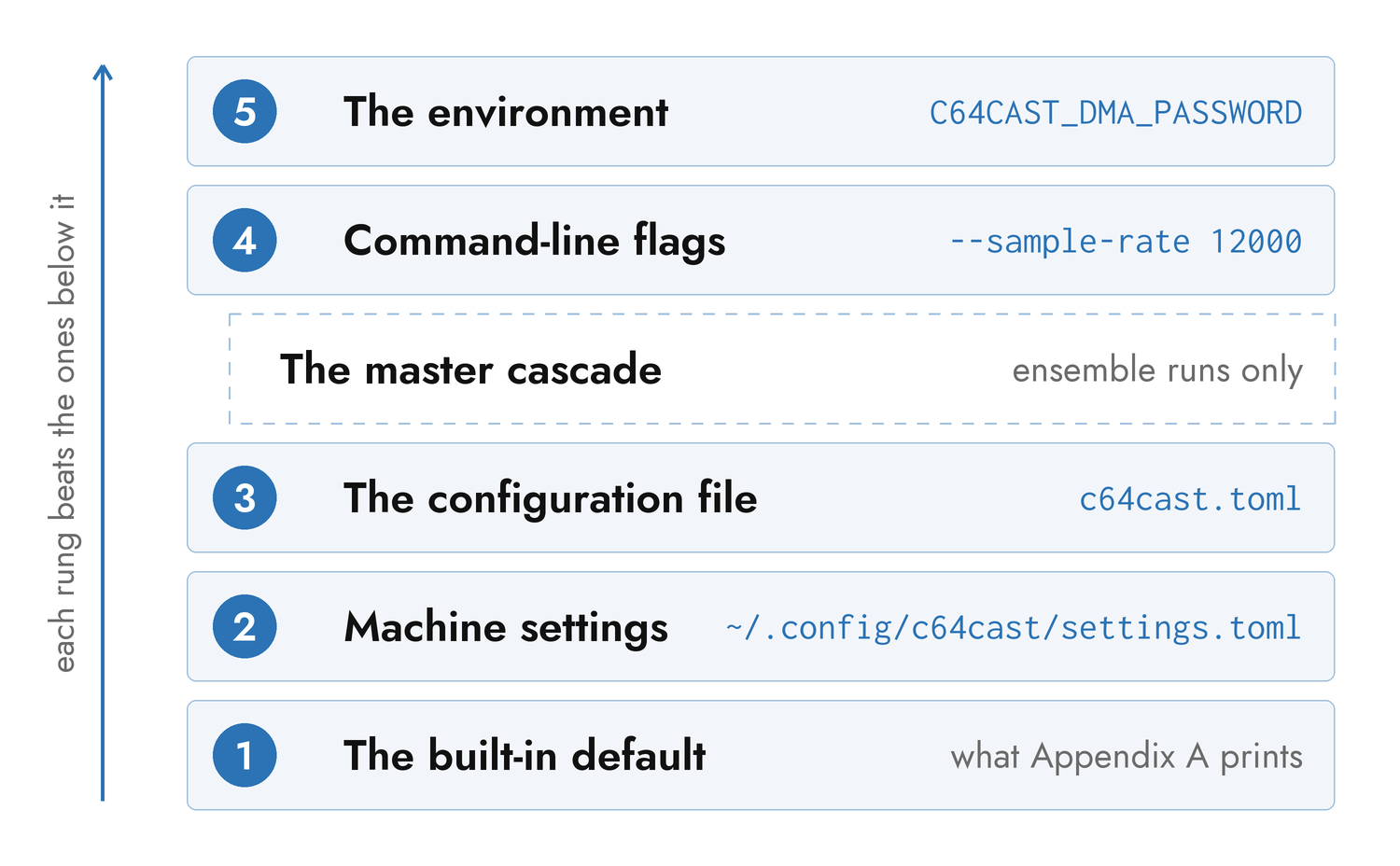
The default is what Appendix A prints. It is chosen to be what most runs want rather than what does least: audio is on, the display pipeline's quality stages are on, and a scene with no display gets the mode that suits its kind of source.
Machine settings answer "what is true of this computer" — which Commodore is on the desk, which capture device is plugged into it, which SID chips it has. They belong to the machine rather than to the show, which is why they sit below the configuration file and why they apply to a run that has no configuration file at all. The next section covers them in full.
The configuration file is the show: the playlist, and any global setting the show needs to differ on. A scene's own [scenes.color] override (see "Scenes and Playlists") sits inside this layer, not above it — it is one [[scenes]] block overriding a sibling [color] block within the same file, resolved once the file is loaded, not another rung on this ladder.
Command-line flags are this run. Every overridable flag defaults to None internally, so "you passed the default" and "you passed nothing" stay distinct — --sample-rate 12000 overrides a file that says 8000, even though 12000 is also the rate most scenes play at when the key is unset.
Two environment variables sit near this layer without being part of it. $C64CAST_URL is a fallback for -u, consulted only when no -u was given, so an explicit flag always wins; it is otherwise exactly a flag. $C64CAST_SETTINGS names the machine-settings file rather than supplying any value of its own.
The environment proper is one variable. C64CAST_DMA_PASSWORD overrides [ultimate64].dma_password from the file (the name predates the REST use: the value is the machine's one network password, sent on both links), and it is an environment variable precisely because it is a secret: there is deliberately no command-line flag for it, so it cannot reach shell history or a process listing.
Seeing Which Layer Answered#
Three things will tell you where a value came from.
c64cast -v logs the file it loaded, and logs the machine-settings file with a field count when one was applied — one line each, at the top of a run.
c64cast --doctor --skip-probe prints the resolved locations of the machine settings and the data directory, and reports what the "auto" fields resolved to for the configuration it was given. It needs no hardware.
c64cast --describe section:NAME prints what each field would be with nothing said at all, which is the value the ladder starts from.
Machine Settings#
Machine settings are a per-machine overlay of defaults, applied to every kind of run — a configuration file, an ensemble, or quick playback from the command line. The point is not to have a second configuration file. The point is that -u, -d and --sid-model describe hardware that does not change between runs, and retyping them is friction.
The file lives at ~/.config/c64cast/settings.toml, honoring $XDG_CONFIG_HOME; on Windows it is %APPDATA%\c64cast\settings.toml. $C64CAST_SETTINGS overrides the whole path.
It holds any non-playlist section — a connection, [video].device, [ultimate64].sid_model, [color] preferences, whatever this machine should assume. It may not hold [[scenes]] or [ensemble]: those are a show, not a machine, and are dropped with a warning naming the file.
Writing It With --save-settings#
The flag persists the machine-relevant flags of the invocation it is attached to, then exits without running anything:
c64cast -u u64://192.168.2.64 -d "Cam Link" \
        --save-settings
Savable this way: -u/--url (decomposed into [hardware].backend and the matching connection section), -d/--device, -D/--audio-device, --sid-model, and -s/--system. The write merges onto whatever the file already held, prints the result, and exits 0. An invocation carrying none of those flags has nothing to save and exits 2.
Two deliberate refusals. $C64CAST_URL is never saved — an environment variable is a temporary override, and silently making it permanent would be a surprise. The DMA password is never written to this file, or to any file the serializer produces.
Everything else is a hand edit. The file takes the same sections as any configuration, so the annotated reference and the schema apply to it unchanged.
Scenes and Playlists#
A scene is one [[scenes]] table. The double brackets are TOML's array-of-tables syntax, and the array's order is the order the scenes play in.
[[scenes]]
type = "waveform"
name = "SID Jukebox"
file = "~/Music/hvsc"

[[scenes]]
type = "slideshow"
name = "Photographs"
display = "mhires"
file = "~/Pictures"
duration_s = 60.0
image_duration_s = 5.0
Every scene takes type, an optional name, an optional duration_s and an optional target_fps; Appendix B lists those and everything each type adds. Chapter 2 is the vocabulary itself.
Overlays attach to a scene as a nested array of tables, [[scenes.overlays]], and paint in declaration order:
[[scenes]]
type = "blank"
duration_s = 30.0

  [[scenes.overlays]]
  type = "clock"
  corner = "top-right"

  [[scenes.overlays]]
  type = "marquee"
  text = "PRESS COMMODORE KEY TO PAUSE"
  row = 0
The indentation is cosmetic — TOML attaches a nested table to the most recent [[scenes]] regardless — but it makes a long playlist readable, and every example in this book uses it.
A scene may also override part of the show-wide [color] section for itself alone, in a [scenes.color] sub-table — not an array, since a scene has at most one color override:
[[scenes]]
type = "video"
file = "clip.mp4"
display = "mhires"

  [scenes.color]
  force_palette = true
  force_palette_colors = 8
Any field [color] takes, [scenes.color] takes too; a field left out follows the show-wide [color] section, exactly as if this scene had said nothing about it. Only scenes that render a frame accept it (webcam, video, slideshow, generative, wled) — the same set effect is scoped to.
[playlist] governs what happens around the scenes: whether the list repeats after the last one (loop, with --no-loop to run once and exit), whether a video from videos_dir is inserted between scenes (interleave_videos), where the SID song-length database lives, and how long the fade to and from black takes at each scene boundary. [interstitial] styles the "UP NEXT" card shown between scenes.
Single-Scene Mode#
A configuration that defines exactly one scene enters single-scene mode. There is no flag for it; it is detected from the count.
In single-scene mode the interstitial is never built, the scene loops by tearing down and setting up again — so a directory of tunes picks a new one each time round — and the CTRL skip is ignored, there being nothing to skip to. Pause and the style cycle still work. interleave_videos is short-circuited, because inserting a video would make the playlist two scenes long and silently defeat the mode.
Every packaged example is a single-scene configuration, which is why each one runs until you stop it.
The Ensemble Cascade#
A master file with an [ensemble] table drives several Commodores from one process. Each named system gets its own connection, audio, playlist and worker thread.
# master.toml
[ensemble]
systems = [
    { name = "left",   config = "left.toml"   },
    { name = "middle", config = "middle.toml" },
    { name = "right",  config = "right.toml"  },
]

[interstitial]
duration_s = 3.0
Each per-system file is a complete, standalone configuration — running c64cast --config left.toml drives that one machine and nothing else, which is how a wall gets debugged. Their paths are resolved relative to the master file's own directory, so a folder holding a master and its systems can be moved, or run from anywhere.
The order of systems is load-bearing: index 0 is the leftmost physical screen and the last entry the rightmost. The cross-system orchestrators in Chapter 6 map content across the wall by that order.
The Extra Layer#
An ensemble inserts one layer into the ladder. Each system resolves defaults, then machine settings, then its own file; then the master's cascade fills in only those fields still sitting at the machine-overlaid baseline; then flags and the environment as before. A per-system file therefore always beats the master that gathered it.
These sections cascade from the master into every system:
| Section | Notes |
|---|---|
[hardware] |
which backend the wall talks to |
[teensyrom] |
except serial_port and host — every TeensyROM+ has its own device node or address |
[ultimate64] |
except url — every machine has its own address |
[audio], [dsp], [audio_features] |
the show's global sound and its analyzer |
[color], [playlist], [interstitial] |
the show's global look |
[vision], [wled] |
the gesture surface and the LED bridge |
[preview], [recording], [debug], [menu], [performance] |
except recording.path — every system needs its own file |
[control], [web] and [midi_control] are read from the master and are not cascaded: there is one control plane, one console host and one MIDI surface for the process, not one per system.
[[scenes]] and [video] never cascade. A playlist and a capture device belong to one machine by their nature; sharing a scene across systems is what orchestrate is for, not a side effect of inheritance. [[scenes]] in a master file is ignored with a warning, and so is [video] — nothing reads it from there.
Every other table in a master file is reported as an unknown table, so a misspelled [hardwear] is named rather than silently doing nothing.
Flags in Ensemble Mode#
-u/--url and -d/--device are rejected in ensemble mode rather than applied to an arbitrary system: they name one machine's hardware, and the per-system files are where that belongs. Every other flag applies uniformly to every system.
Validation#
Problems are caught at four moments, and the earlier ones are worth provoking on purpose before a show.
Parsing. A TOML syntax error names the file, the line and the column, and prints the offending line with a caret under it.
Loading. An unknown key inside a section it recognizes is dropped with a warning naming the section, the key, and the closest key it knows — a misspelled dither_strengh tells you so. It is a warning rather than an error because a configuration written for a newer version should still run. Values are checked as they land: a tri-state that is neither boolean nor "auto", a malformed camera identifier, an empty audio-device string, and a [color] forced-palette specification that does not describe a palette all raise here.
A misspelled section name is the one class of typo the loader does not report: it looks for the sections it knows, and never asks what else was in the file. This is exactly what the #:schema line catches, in the editor, as you type.
Building a scene. The per-scene checks run when the playlist is assembled: an unknown display mode, a file spec that resolves to nothing, a required field that is absent, duration_s on a video scene (rejected, because a finite duration would either truncate a long clip or do nothing to a short one), an overlay attached to a display mode that cannot host it, and a scene declaring orchestrate without the name that makes it addressable.
Running. What is left is what only the hardware can answer: whether the Commodore is reachable, whether the DMA service is enabled, whether the camera opens.
--doctor#
--doctor runs every check that does not require the stream to start, prints a grouped report, and exits.
c64cast --doctor --config my.toml     # full, with probe
c64cast --doctor --config my.toml --skip-probe
c64cast --doctor --config example:ensemble/master
It never stops at the first failure — a broken scene 1 does not hide a broken scene 5 — and it reports on a whole ensemble system by system. The report is grouped: ENVIRONMENT (the version, the interpreter, the hard dependencies, where settings and data resolved to, which character ROM is in use), CONFIG (keys no section accepts, and a #:schema first line that has stopped describing this install), SCENE (one line per scene, with its resolved display mode and overlay count), AUDIO (what the "auto" backend and DAC-curve fields resolved to), COLOR (what the "auto" dither, palette and force-palette fields resolved to), RECORDING, CONTROL, MIDI_CONTROL, WLED, ORCHESTRATOR for an ensemble, EXTRAS (which optional features are installed, with the command to install a missing one), and CONNECTIVITY unless you skipped the probe. On an Ultimate, CONNECTIVITY includes a row named after each machine with (device) appended, read from GET /v1/info: product, unit ID, firmware, FPGA and core versions, and the firmware build hash on 3.15a and later.
On Ultimate firmware 3.15 or newer, CONNECTIVITY also warns when the Ultimate menu is open on the machine, and -v logs the text the menu is showing. Doctor only reads the menu and never opens or closes it. Older firmware, including C64 Ultimate 1.1.0, cannot report the menu, so the row is left out.
Each row is ok, warn or error. The exit code is 0 when every row is ok or warn, and 1 when any row is an error — which makes it safe to gate a script on.
--doctor --skip-probe is the fast offline check, and the one to run after editing a file.